
Telehealth nursing depends on clear video and audio for effective patient care. Choosing the right webcam improves communication and trust.
A good webcam shows sharp images and captures sound clearly. It helps nurses connect with patients during virtual visits. Features like HD video, light correction, and noise reduction make a big difference. Compatibility with popular apps such as Zoom and Microsoft Teams is essential.
Privacy covers add extra security when the camera is not in use. Affordable options with reliable performance exist for all budgets. This guide covers top webcams that meet telehealth nursing needs. Each model offers unique benefits to enhance virtual care. Find the best fit to support your telehealth work and provide better patient experiences.
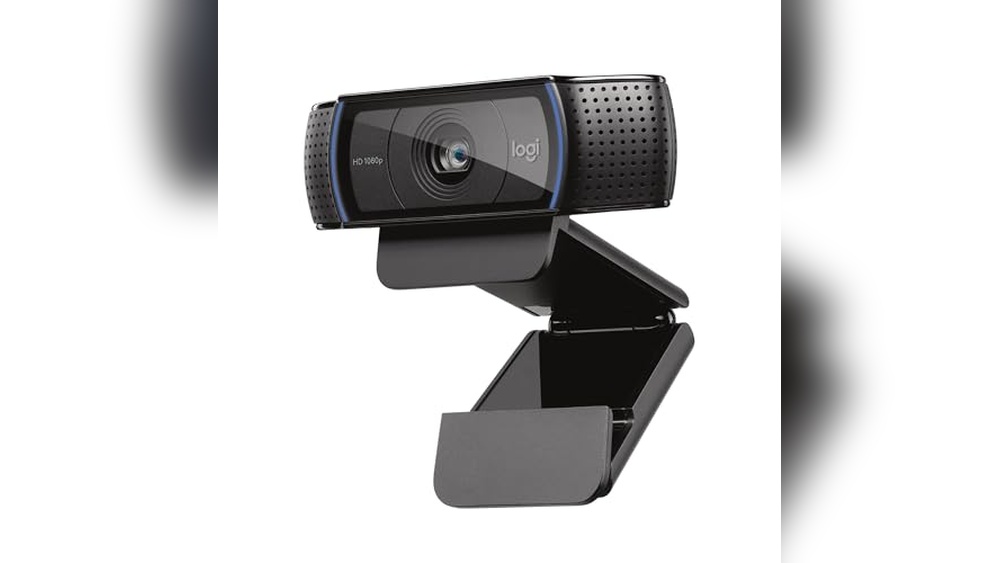
Logitech C920x Hd Pro Pc Webcam

The Logitech C920x HD Pro PC Webcam is ideal for professionals, content creators, and remote workers seeking a reliable and high-quality video conferencing solution. Whether you frequently attend virtual meetings on platforms like Microsoft Teams, Google Meet, Zoom, or enjoy streaming and video chatting on your Nintendo Switch 2, this webcam offers excellent performance to enhance your visual communication.
Pros:
- Provides Full HD 1080p video at 30fps for crisp and clear visuals
- Equipped with HD light correction to ensure optimal image quality even in low-light conditions
- Integrated clear audio with dual microphones for natural sound
- Compatible with multiple platforms including Microsoft Teams, Google Meet, Zoom, and Nintendo Switch 2’s GameChat mode
- Compact and lightweight design with dimensions 3.7 x 1.7 x 2.8 inches and weighing only 0.35625 pounds
Cons:
- No built-in privacy shutter, requiring additional accessories for privacy protection
- Maximum frame rate limited to 30fps, which may not satisfy users seeking higher frame rates
The Logitech C920x HD Pro webcam stands out due to its ability to deliver professional-grade 1080p video quality that significantly improves the clarity of your video calls and streams. Its HD light correction technology automatically adjusts the image to maintain brightness and detail regardless of your environment’s lighting, making it perfect for home offices or less-than-ideal lighting setups. This ensures that you always present a polished and professional appearance during virtual meetings or live streams.
Another key feature is the webcam’s dual microphones that capture clear and natural audio, reducing the need for external audio devices. The device’s broad compatibility with popular communication platforms and the innovative support for Nintendo Switch 2’s GameChat mode make it a versatile choice for various users. Its compact and lightweight design allows easy portability and setup, fitting seamlessly into any workspace without clutter.
To buy this product, click here.
Edew 1080p Webcam

The Edew 1080P Webcam Computer Camera is ideal for professionals, students, and content creators who need a reliable, high-quality webcam for video conferencing, online classes, or streaming. If you use platforms like Zoom, Skype, or other streaming services on your PC, Mac, laptop, or desktop, this webcam is designed to enhance your video experience with clear visuals and convenient features.
Pros:
- Provides 1080P Full HD video quality for sharp and clear images.
- Includes a built-in microphone for seamless audio capture.
- Features auto light correction to improve video clarity in different lighting conditions.
- Equipped with a wide view angle for capturing more background or multiple people.
- Comes with a built-in privacy cover to ensure security and privacy when not in use.
- Plug & Play USB connectivity makes setup quick and easy without additional drivers.
- Lightweight design (0.33 pounds) for portability and easy installation.
Cons:
- May not perform optimally in extremely low-light environments despite auto light correction.
- The built-in microphone might pick up background noise in noisy settings.
- Lacks advanced manual adjustment settings for professional users.
The Edew 1080P Webcam combines high-definition video with user-friendly features that make it an excellent choice for everyday use. Its auto light correction function automatically adjusts the image brightness, ensuring that users look clear and professional even in less-than-ideal lighting conditions. This feature is especially beneficial for remote workers and students attending video calls from various environments. Additionally, the wide-angle lens allows for greater flexibility in framing, perfect for group calls or showing more of your surroundings during streams.
With plug and play USB functionality, this webcam is compatible with multiple operating systems, including PC and Mac, requiring no additional software installation. The built-in privacy cover offers peace of mind by protecting your privacy when the camera is not in use, a feature that is increasingly important in today’s digital landscape. Lightweight and easy to mount, the Edew webcam fits seamlessly into any workstation setup, enhancing communication quality without hassle.
To buy this product, click here.
Logitech C270 Hd Webcam

The Logitech C270 HD Webcam is ideal for individuals seeking an affordable yet reliable video calling solution. Perfect for remote workers, students attending online classes, gamers using Nintendo Switch 2’s new GameChat mode, and anyone looking to enhance their video communication on PC, Mac, laptops, or tablets, this webcam offers quality performance without breaking the bank.
Pros:
- 720p HD widescreen video for clear and crisp video calls
- Built-in light correction improves video quality in low-light environments
- Noise-reducing microphone delivers clearer audio during calls
- Compatible with popular platforms like Zoom and Nintendo Switch 2’s GameChat mode
- Compact and lightweight design, easy to carry and set up
Cons:
- Video resolution limited to 720p, not Full HD or higher
- No built-in privacy shutter for camera lens
- Fixed focus may not offer the sharpest image at varying distances
The Logitech C270 HD Webcam features a 720p widescreen video capability that ensures your video calls are clear and visually appealing. Its integrated light correction technology automatically adjusts to lighting conditions, providing bright and well-lit images even in dim environments. This makes it especially useful for those working or studying from home where lighting may not be ideal. The webcam’s noise-reducing microphone enhances audio clarity, minimizing background noise so your voice comes through clearly during meetings or gaming sessions.
Designed for versatility, the webcam works seamlessly with major platforms such as Zoom and Nintendo Switch 2’s GameChat mode, making it a great choice for both professional and recreational use. Its lightweight and compact form factor allows easy portability and quick setup across various devices including PCs, Macs, laptops, and tablets. While it may lack advanced features like Full HD resolution or a privacy shutter, its affordable price and dependable performance make it an excellent option for everyday video communication needs.
To buy this product, click here.
Frequently Asked Questions
What Webcam Offers The Best Video Quality For Telehealth Nursing?
The Logitech C920x HD Pro delivers sharp 1080p video at 30fps. It ensures clear visuals for accurate patient assessment during telehealth sessions.
Which Webcams Have Built-in Privacy Covers For Security?
The Edew 1080P Webcam includes a built-in privacy cover. It protects patient confidentiality and prevents unauthorized video access.
Are These Webcams Compatible With Popular Telehealth Platforms?
Yes, Logitech C920x, Edew 1080P, and Logitech C270 work with Zoom, Microsoft Teams, and Google Meet. They support seamless telehealth communication.
Do These Webcams Perform Well In Low-light Telehealth Environments?
Both Logitech C920x and Edew 1080P feature auto light correction. This ensures clear video quality even in dimly lit rooms.
Which Webcam Has The Best Audio Quality For Telehealth Calls?
The Logitech C920x HD Pro offers clear audio with noise reduction. This improves communication clarity during telehealth nursing consultations.
Can These Webcams Be Easily Used With Laptops And Tablets?
All three webcams support plug-and-play USB connectivity. They are compatible with PC, Mac, laptops, tablets, and even Nintendo Switch 2’s GameChat mode.
Conclusion
Choosing the right webcam is key for telehealth nursing. Clear video helps nurses see patients better and build trust. The Logitech C920x offers sharp Full HD quality and clear audio. Edew’s 1080P webcam has a wide view and privacy cover for security.
The Logitech C270 provides good HD video and reduces background noise. Each webcam fits well with popular apps like Zoom and Microsoft Teams. Good lighting correction ensures clear images even in low light. Easy setup means less time troubleshooting and more time caring for patients.
A reliable webcam improves communication and patient comfort. Pick one that fits your needs and budget. Quality video tools make telehealth nursing smoother and more effective.

Leave a Reply